

Local AI on CPU Only – Crystal and the Art of Compromise
Local AI on CPU Only – Crystal and the Art of Compromise
Boardesign, 25/06/2026
Using artificial intelligence today — especially frontier models — usually means sending your own data to a server that could be anywhere in the world, with no real way to verify what happens to it. For plenty of use cases that’s perfectly fine. But if you work, as we and many of our clients do, with circuit schematics, confidential datasheets, product specifications, or source code, then that innocent-sounding phrase — “upload the document and ask a question” — hides a real problem: those documents, at that exact moment, leave your network and end up on someone else’s infrastructure.
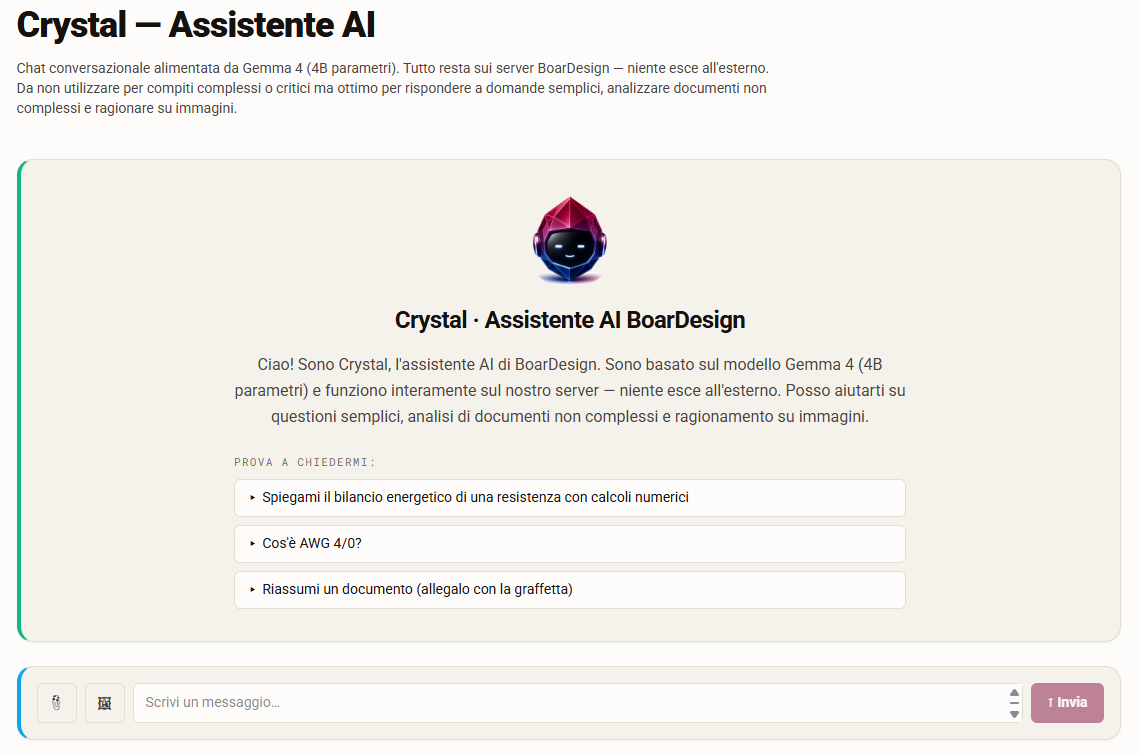
That’s not the only way to use AI, though — we chose a different path. Crystal, the AI assistant built into our portal, runs locally: the model lives on a machine you control — a PC or a server in-house — and the data never leaves it. No cloud, no third parties, no consumption-based subscriptions. In this article I want to walk you through the concrete advantages of this approach, but also — because it would be dishonest to hide them — the constraints it brings, and how we deal with them through what is, in every sense, a genuine engineering discipline: prompt engineering.
AI That (Really) Runs at Home
Under the hood, Crystal uses Google’s Gemma 4, in its compact 4-billion-parameter (4B) variant, run through Ollama, a runtime that lets language models execute directly on local hardware. No data center required: Crystal can run on a machine with CPUs alone, with no expensive dedicated graphics cards or GPUs.
That changes everything, and the benefits are concrete:
- Total privacy. Documents and conversations never leave the machine. For anyone with confidentiality constraints — intellectual property, trade secrets — or who has to comply with regulations like GDPR and the NIS2 directive, it’s the difference between being able to use AI and not being able to use it at all.
- Predictable costs. No per-token fees, no surprise bill at the end of the month. You install it once, on hardware the company often already owns.
- Control and continuity. The model doesn’t change under your feet, doesn’t get “deprecated,” and doesn’t require an always-on connection. It even works air-gapped — on a machine completely isolated from the internet.
- Modest hardware. You don’t need a monster machine: the beauty of a 4B model is precisely that it runs on unremarkable hardware.
That’s the good part. But there’s a flip side, and it’s exactly that last point.
The Flip Side: The Constraints of “CPU-Only”
Running an LLM on CPU, with no GPU, and with a “small” model, imposes three very real limits you have to reckon with every day:
- The model is small. Four billion parameters is little compared to the hundred-billion-plus models running in the big clouds. That means less “encyclopedic knowledge” and lower precision on details: a model this size can get a numeric value or a niche fact wrong.
- The context window is limited. This is the model’s “working memory” — how much information it can hold in view during a single turn. In our case it’s fixed at roughly 4,000 tokens, a few thousand words. Everything has to fit in that space: the instructions, the relevant chunk of the document, the question, and the answer.
- Inference is slow. Without a GPU, the model generates text at a rate of a few words per second, not hundreds. A long answer takes time.
These three constraints are the price of privacy and independence. So the question becomes: how do you make an AI assistant genuinely useful within these limits? The answer isn’t “buy a bigger model” — that would defeat the whole point of running locally. The answer is engineering.
Prompt Engineering: The Art of Compromise
This is the heart of the work, and it’s the part that polished demos never show. With abundant resources you can afford to be generous, even wasteful. With a fixed, tight budget, every choice is a trade-off: everything competes for the same limited context space and the same limited compute time. The more capability you ask of the model, the more budget you spend. The art lies in finding the balance.
Here are three concrete examples, taken from our actual work on Crystal.
Retrieve instead of dump. If you attach a twenty-page document, we can’t feed the whole thing to the model — it simply doesn’t fit in the context window. So we build, on the fly and locally, a kind of index of the document, and for every question we retrieve only the relevant fragments to insert into the context. This is the technique known as RAG (Retrieval-Augmented Generation). The result: the model always “sees” the right part of the document, without ever blowing the budget.
Shift the work from the model to the code. We wanted Crystal to draw charts. The naive approach is to ask the model to produce the complete chart in a rigid, technical format. But a 4B model often gets that format wrong, and the chart fails to render. The elegant solution is to flip the problem: we ask the model for just the data — a handful of numbers — and let our own code build the actual chart, correct by construction. The same principle applies to diagrams: we constrain the model to only the formats it can handle reliably, instead of letting it invent nonexistent syntax. In practice: we take off the model’s shoulders everything it doesn’t strictly need to do.
Be honest about the limits. A small model does sometimes get things wrong. Instead of pretending it’s infallible, we design around it: we ground answers in the documents the user provides — so Crystal cites what’s actually there, not what it imagines — and we label as “illustrative” any values the model proposes when no real data is available. That’s how trust is built — not by hiding the limits, but by managing them.
There’s also a subtler, almost philosophical balance at play. Every instruction we add to the system to make it more capable eats into context space and compute time — that is, it takes space and time away from the actual answer. Sometimes the right move isn’t to add, but to remove: a more concise line of prompt, or a feature moved into code, is worth more than a page of instructions. It’s exactly the same performance-versus-functionality trade-off that anyone who designs real systems knows well.
”Installing a Local LLM” Isn’t Just Downloading a Model
I want to dispel a misconception here. Setting up a local AI assistant that’s actually useful isn’t “download a model and hit enter.” That’s the starting point, not the finish line. The real work is all around it:
- choosing the right model for the available hardware, balancing size, speed, and quality;
- configuring the runtime (Ollama, in our case) to get the most out of the machine;
- building the retrieval pipeline for documents, so the model always sees the relevant information;
- calibrating the prompt, measuring the cost of every addition as you go;
- moving into code everything the model shouldn’t — and can’t — do reliably;
- rendering the result (formulas, charts, diagrams) robustly, gracefully handling the cases where the model gets it wrong.
This is exactly the kind of work we do at BoarDesign: taking a cutting-edge technology and engineering it around a client’s real constraints — their hardware, their documents, their confidentiality requirements. Crystal is our living proof of concept; but we can replicate the same approach at your site, on your own server, with your data never leaving your network.
Final Thoughts
The most useful AI isn’t necessarily the biggest one. It’s the one that’s right for your constraints. A giant cloud model is magnificent, right up until you need confidentiality, cost predictability, answers “grounded” in your own information, or simply the right to keep your data in-house. At that point, a compact model running on your own CPUs — with all the engineering work described here — stops being a compromise and becomes the strategically better choice.
It is a trade-off, certainly. But without a data center of your own, and for straightforward tasks, it’s absolutely a valid solution. Crystal is live on our site, in the tools portal: you can test it directly, after registering on the site. You’ll also discover other tools that might be useful to you.