

ExpertForge
BetaYour own team of experts
Open sign-up, no credit card required. · Revision 1.2 · August 2026 · PDF, 3.3 MB · Italian

-
3
AI experts in parallel, with a synthesising team leader
-
12
document types, from a social post to a book
-
6
export formats: PDF, DOCX, PPTX, HTML, ODT, EPUB
-
5
interface languages: IT, EN, FR, ES, DE
At a glance
A SaaS platform that turns a professional’s or a company’s documents, datasheets, books, standards and knowledge sources into an always-available team of AI experts, able to answer questions, run research and generate documents, presentations, images and applications.
ExpertForge is a browser-based software platform that gives a professional, an engineering practice or a company a team of AI-based experts grounded in its own documentation. Manuals, datasheets, standards, procedures, project notes, scientific papers, web content: everything that makes up the knowledge assets of the people doing the work becomes the basis on which the experts answer, search and produce.
What sets it apart from a generic conversational assistant is not only the quality of the answers, but what happens after the answer: ExpertForge takes the user all the way to the finished document — a report, a manual, a presentation, a video presentation, an image, an interactive application — without leaving the application and without having to rework the material downstream.
Six distinctive elements
A team, not a single model
Up to three different language models answer the same question in parallel; a fourth model, the team leader, produces a reasoned synthesis highlighting where the answers converge and where they diverge. It is a concrete way to gauge how reliable what you are reading is.
Your own knowledge, in adjustable doses
For each expert you choose how much weight your personal knowledge base should carry: exclusive, prioritised, complementary or excluded. The same tool therefore serves both rigorous work on your own sources and free-form exploration.
From question to finished document
Twelve document types, from a social post to a book, generated through a guided path that goes through the outline, the editorial draft and the editor, with export in six formats and MP4 video-presentation generation.
Costs always visible
Every operation that engages a model shows an estimate before and a final figure after, computed on actual consumption. Nothing starts before the user knows what it is about to cost.
No installation
Access is through an ordinary browser. No software to install on the PCs, no updates for the user to manage, no dedicated hardware.
Multilingual and customisable
A five-language interface and an appearance (theme, colours, typography, density) adjustable to each user’s preferences; the instance’s name, logo and visual identity are configurable.
The problem ExpertForge solves
Anyone who works with technical documentation knows three recurring frictions. The first is the time spent finding information you know you have: an application note read months ago, a paragraph of a standard, a figure in a five-hundred-page manual. The second is the unreliability of generalist assistants when the question is specialised: they always answer, but you cannot tell on what basis. The third is the distance between the answer and the actual work: even correct answers still have to be composed, rewritten, laid out, illustrated and turned into a deliverable document.
ExpertForge tackles all three together. The knowledge base solves the first, because search works by meaning (semantic search) as well as by words; source grounding and precise citation solve the second, because every statement can be traced back to the document and the page it came from; the document generator solves the third, because the answer is not the destination but the raw material of the deliverable.
How it works: from knowledge to deliverable
The application is built around a simple path that holds for any activity: you bring in the sources, you question the team of experts, you collect the results into a deliverable. Everything produced can in turn re-enter the user’s reusable assets.
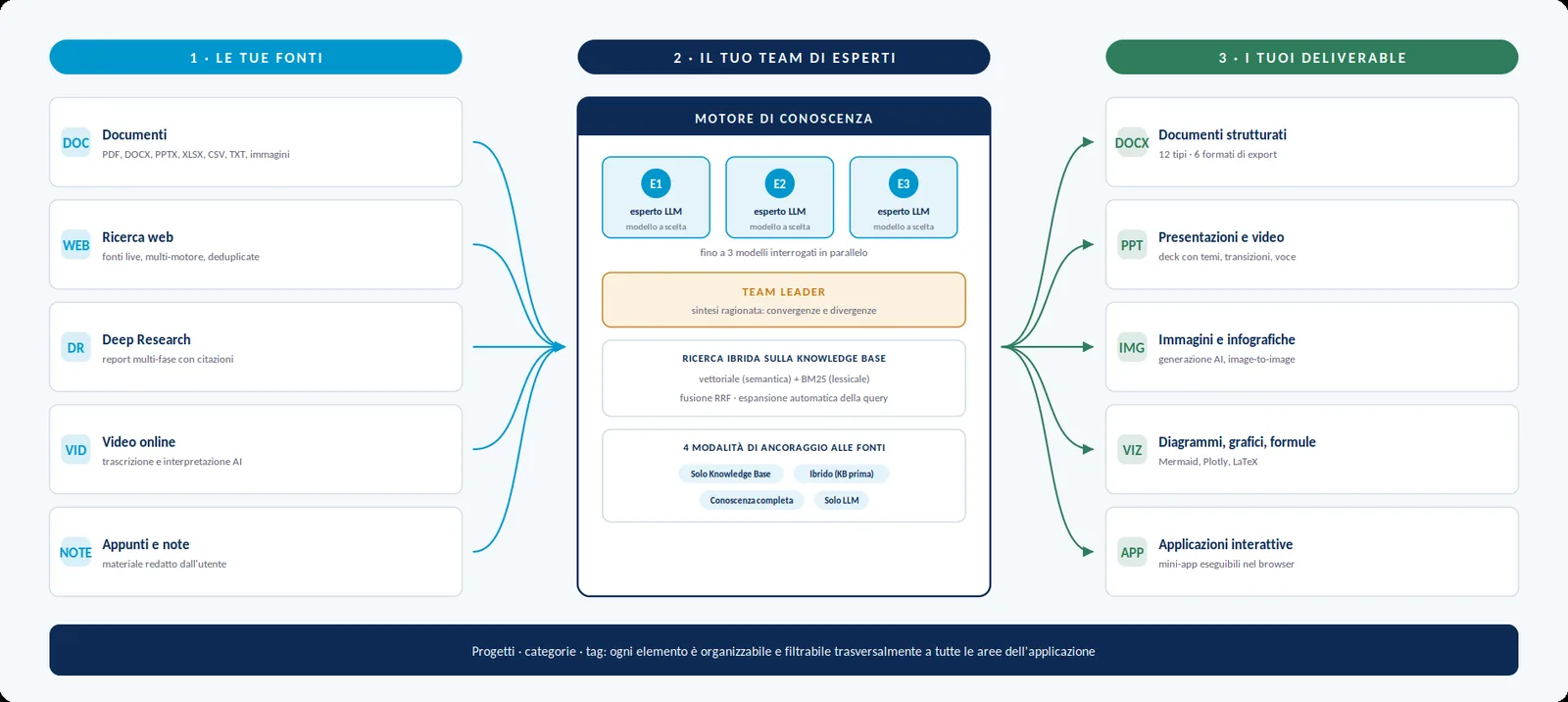
The functional areas
The application is organised into seven areas, reachable from the side menu. Each is self-sufficient, but all share the same knowledge base, the same resource archive and the same organisation by project.
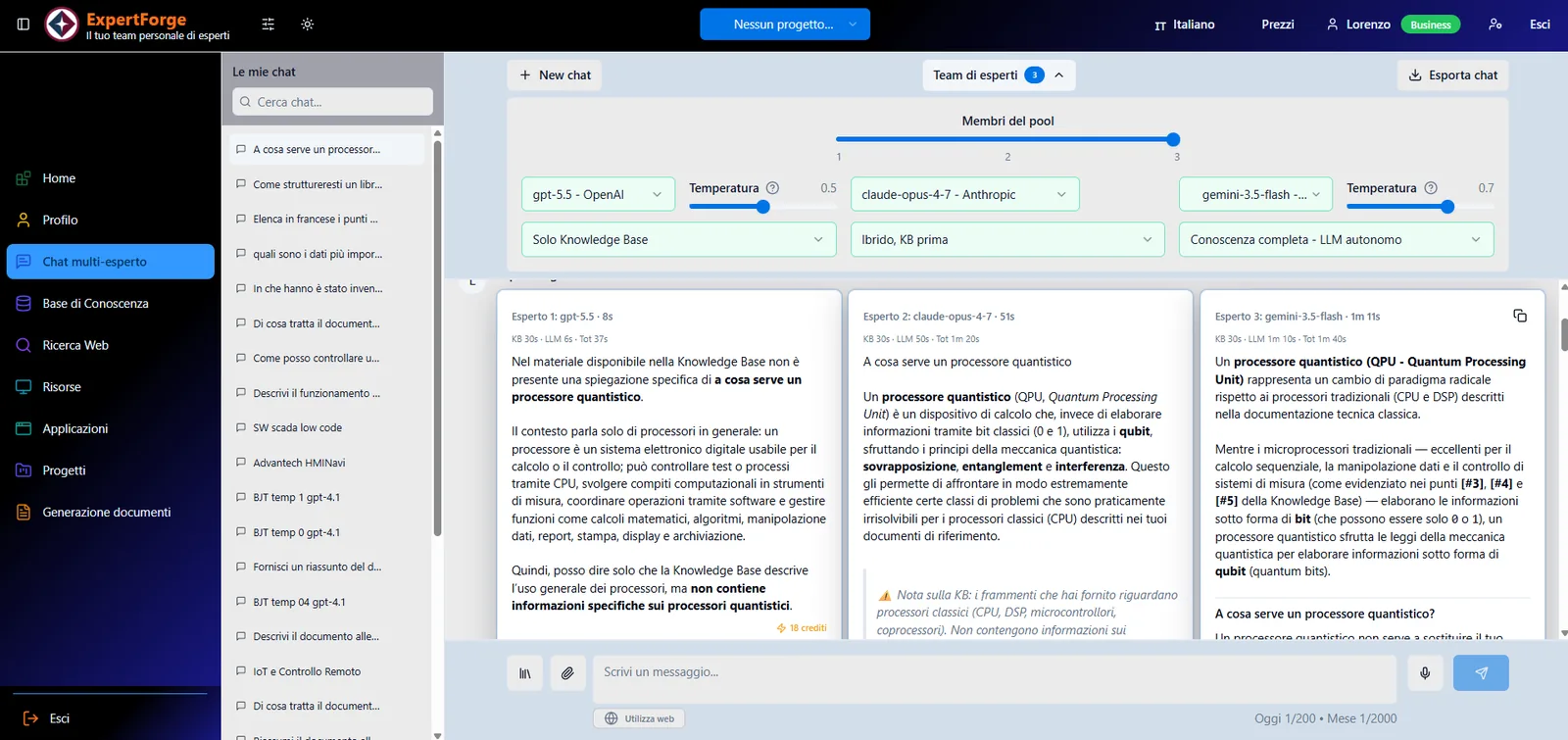
Multi-expert chat
This is the daily entry point. A conversation can involve from one to three simultaneous experts, each with its own language model, its own temperature and its own knowledge-base grounding mode. The answers appear side by side and are immediately comparable.
- Team leader — a model of your choice analyses the experts’ answers and produces a synthesis that explicitly states convergences and divergences.
- Automatic model selection — for those who would rather not choose, the system picks the model suited to the question according to three profiles — economical, balanced, high-performance.
- Attachments and dictation — you can attach files to an individual question or pull items from your personal archive; voice dictation lets you write by speaking.
- Optional web search — a switch enables consultation of real-time sources while answering, for the models that support it.
- Rich answer rendering — structured text, code with highlighting for over 180 languages, mathematical formulas, diagrams and interactive charts are rendered directly in the conversation.
- Cost traceability — below each answer you see what it cost; two counters always show requests consumed against the plan’s limits.
Conversations are saved with an automatically generated title, and are searchable, renameable and exportable.
Knowledge base
This is the heart of the product: the private archive of documents on which the experts base their answers. Ingesting a document is not a simple upload but a processing chain that preserves its structure — headings, tables, formulas, images — and makes it searchable by meaning.
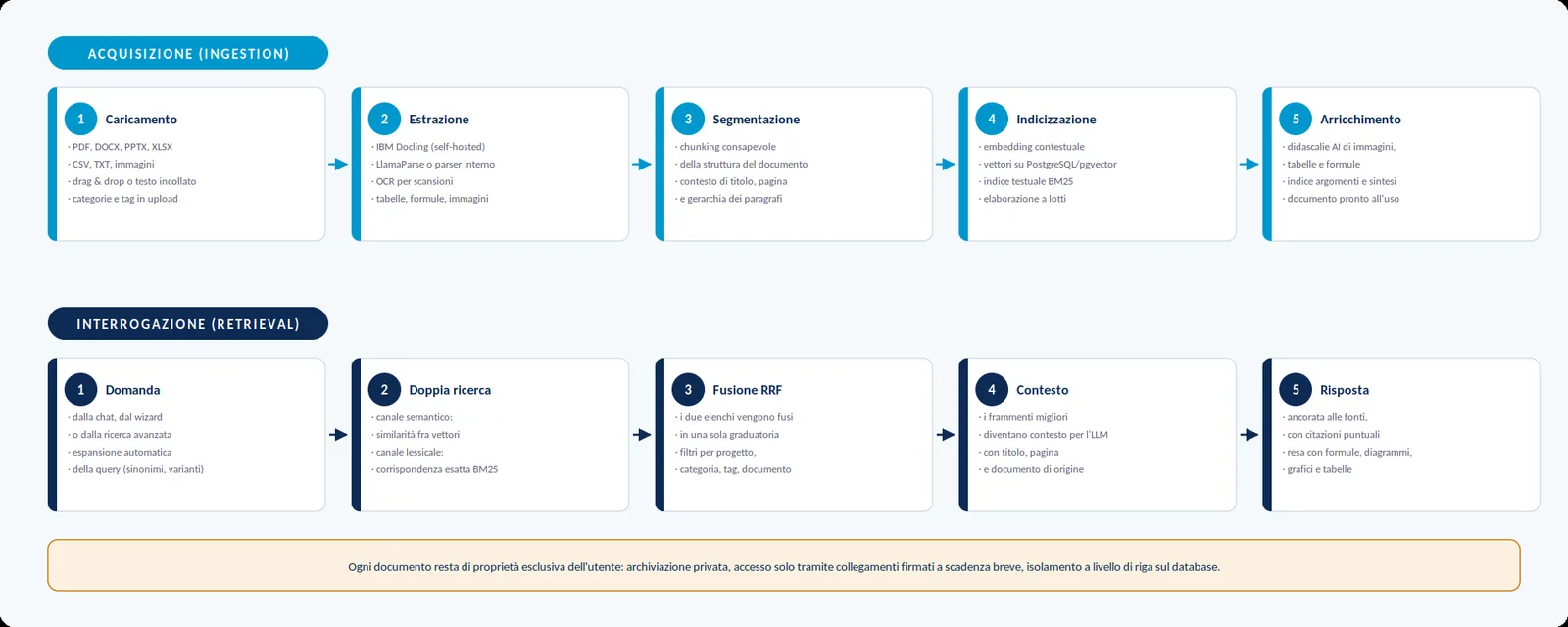
You can upload PDFs, Word documents, presentations, spreadsheets, text, tables and images; the maximum size of a single file depends on the plan. At upload time you choose the processing options: retention of the original, automatic generation of a topic index and description, optical recognition for scans, advanced extraction of formulas and tables for technical documentation.
The knowledge-base tools
Query a single document
A conversation dedicated to one document, isolated from the rest of the archive, with citations referring to the source page. It is the way to study a contract, a paper or a specification in depth without cross-contamination.
Advanced search
Search across the whole archive in semantic, lexical or hybrid mode, with automatic query expansion and a side conversation panel that uses the results as context.
Tailored summaries
An AI-generated synthesis whose length is adjustable from 10% to 50% of the original document, exportable or pushed back into the archive as new material.
Organisation
Categories with colour and description, free-form tags, activation and deactivation of individual documents from searches, and combinable filters by name, type, date, category and tag.
Web search and Deep Research
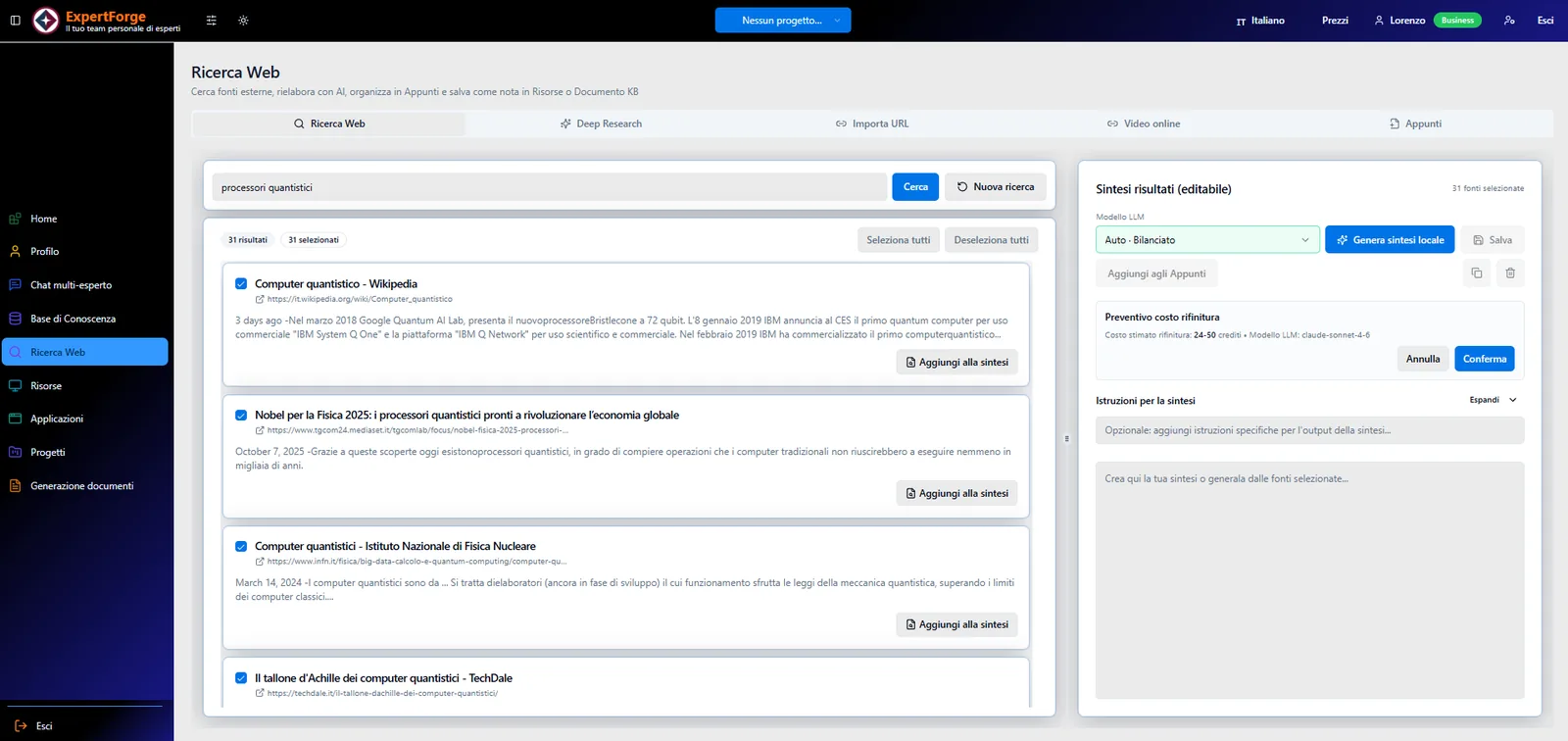
An investigation environment over external sources, not a plain search engine. Ordinary search queries two engines simultaneously and merges the results, removing duplicates; the selected sources can be summarised by an expert with custom instructions on tone, length and structure.
- Deep Research — across three depth levels, it breaks the objective down into sub-questions, analyses the sources and produces a report listing the references used. The process is asynchronous: you keep working while it runs.
- Import from URL — extracts the main content of a web page and makes it available for reworking or archiving.
- Online video — retrieves a video’s transcript and interprets it, turning audiovisual content into usable text.
- Notes — an editorial workspace with a full editor where the results of every research tab converge, so you can compose a single document to save among your resources or in the knowledge base.
Generating documents, presentations and video
This is the function that turns knowledge into a finished product. A guided path leads from choosing the document type all the way to export, with the option to step in manually at every stage: automation never takes control away from the author.
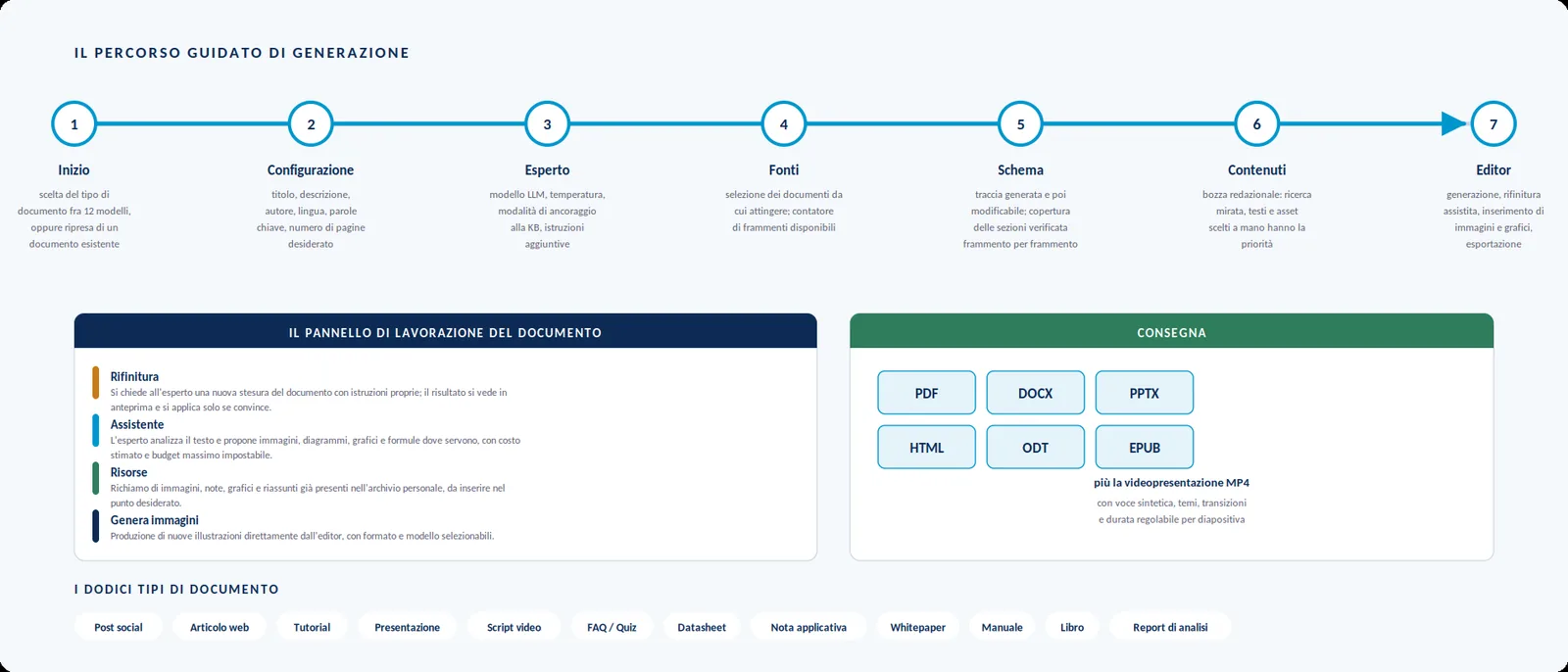
Two steps deserve particular attention. In the outline the application does not merely propose a structure: section by section it checks how much knowledge is actually available in the selected sources, flagging the parts that would remain uncovered. In the content step the author composes an editorial draft with hand-picked text, excerpts and images: this material takes precedence over automatically retrieved material, and is the way to stamp your own mark on the result.
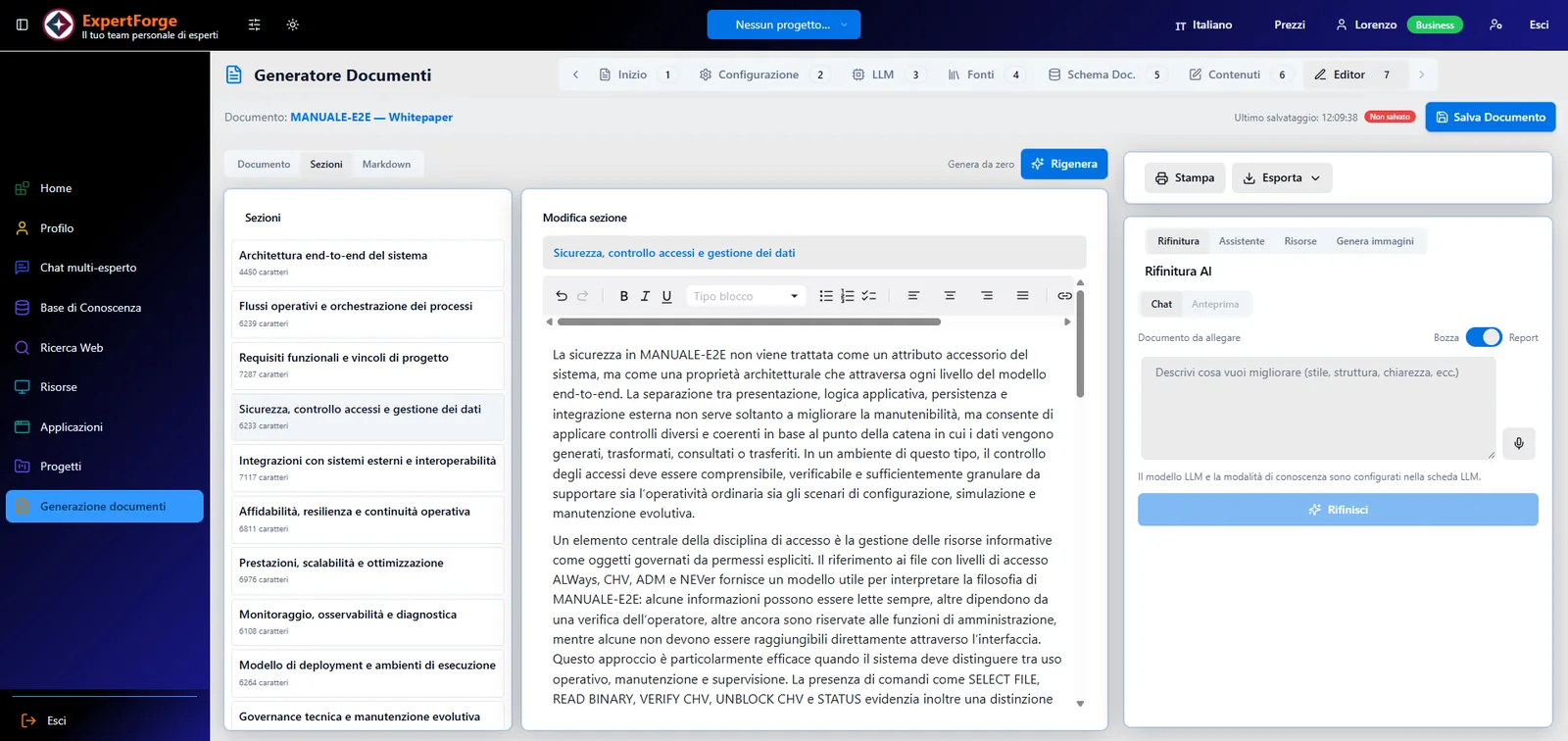
In the editor the document can be refined by asking the expert for a new draft following your own instructions, and enriched with an assistant that analyses the text and proposes images, diagrams, charts and formulas where they are needed — with a maximum spending budget you set before generating them.
Images and the resource archive
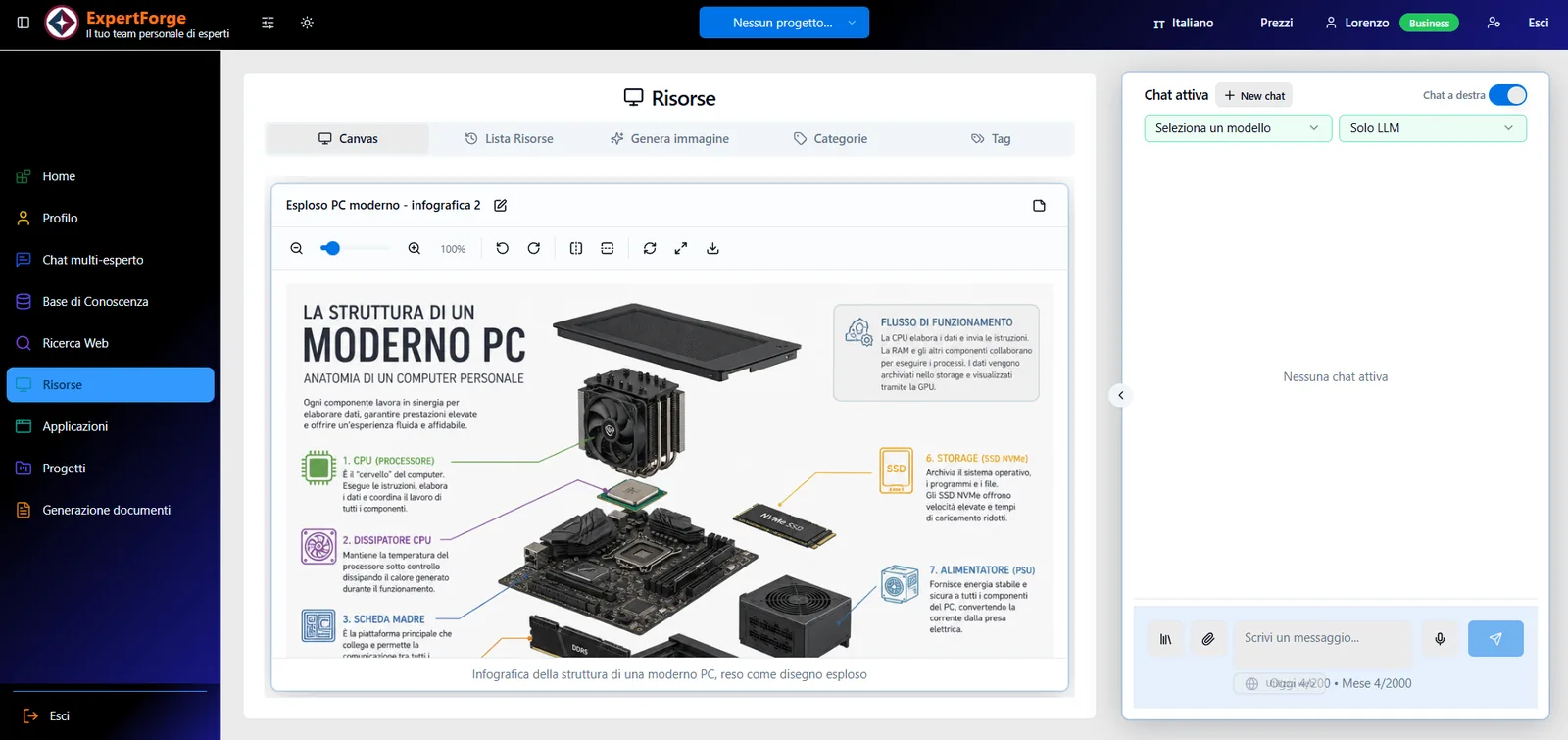
Everything the AI produces — images, charts, diagrams, code snippets, notes, summaries — converges into a personal archive filterable by title, type, date, category and tag, with an immersive viewer offering zoom, rotation, full screen and download. In the same area you generate new images by specifying the model, the format, the number of alternatives and optionally a reference image; the credit estimate is shown next to the generate command.
Interactive applications
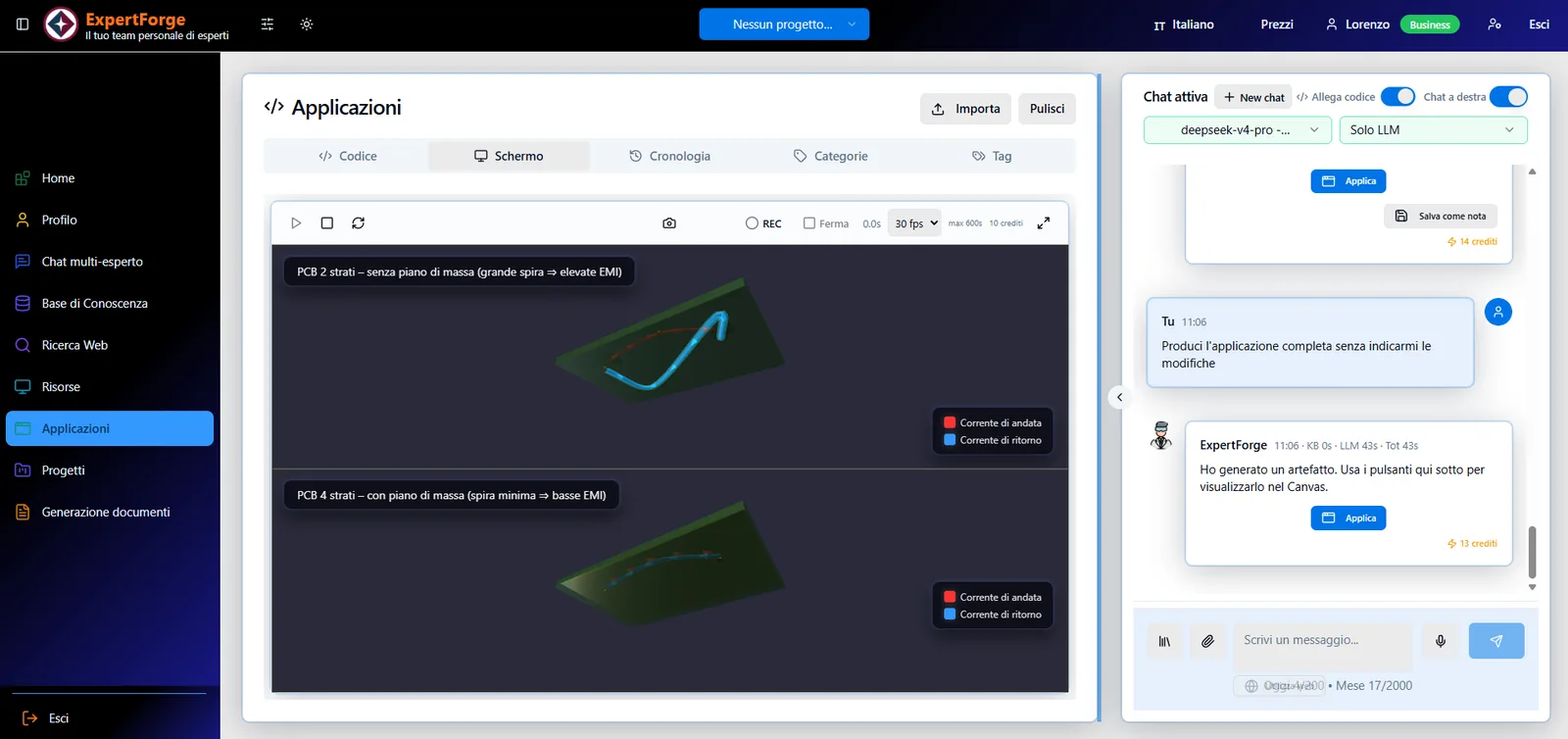
A function that exploits the models’ ability to write code: analysis dashboards, animations, simulations, dynamic charts, interactive presentations and small calculation tools, built by conversing with the expert and based on your own knowledge-base data. The applications run in a sandboxed environment inside the browser, can also be edited by hand, keep a version history and can be captured as an image or recorded as video to enrich your documents and complete your videos.
It is a rapid-prototyping tool, not a development environment: the applications live in a single file and use a limited set of libraries. Within those limits, though, they make a concept immediately demonstrable — and exportable for a client or a presentation.
Projects
A project is a logical folder grouping conversations, documents, resources, applications and reports that share a purpose — a client, a product, a piece of research. Selecting the active project from the top bar filters every view of the application accordingly, and new items flow into it automatically. It is the way to keep different working contexts separate without duplicating anything.
Usage scenarios
The same functions take on different value depending on the trade. Six examples among many.
Design practice
Datasheets, application notes, product standards and schematics flow into the knowledge base. Advanced extraction makes formulas and tables searchable; from there come technical specifications, application notes for the client, user manuals and compliance reports.
Engineering and quality departments
Procedures, specifications, standards and minutes become searchable by meaning. Answers stay anchored to approved documents, and from them you generate checklists, operating instructions and periodic reports with a level of traceability that a text search cannot offer.
Consulting and training
A lecturer’s or a consultant’s reference corpus turns into handouts, presentations with coherent graphic themes, assessment quizzes and voiced video presentations, produced in timeframes that make per-class or per-client customisation sustainable.
Marketing and content creation
Whitepapers, web-optimised articles, posts and video scripts built on the product’s real documentation instead of generic descriptions, complete with illustrations and diagrams generated in context.
Research and development
Scientific papers and patents in the knowledge base, Deep Research over external sources, a three-model comparison on open questions and the team leader’s synthesis: a structured way to inform a technical decision and leave a record of it.
Professional practices and SMEs
A single environment where the organisation’s knowledge stops being scattered across folders and people and becomes a searchable resource, shareable by project and able to produce documents ready to deliver.
Architecture and technology
ExpertForge is a modern web application: the user works in a browser, and the sensitive logic lives entirely on a server. The design follows three criteria — independence from AI providers, configurability without touching code, and a clean separation between what the browser may see and what must stay on the server.
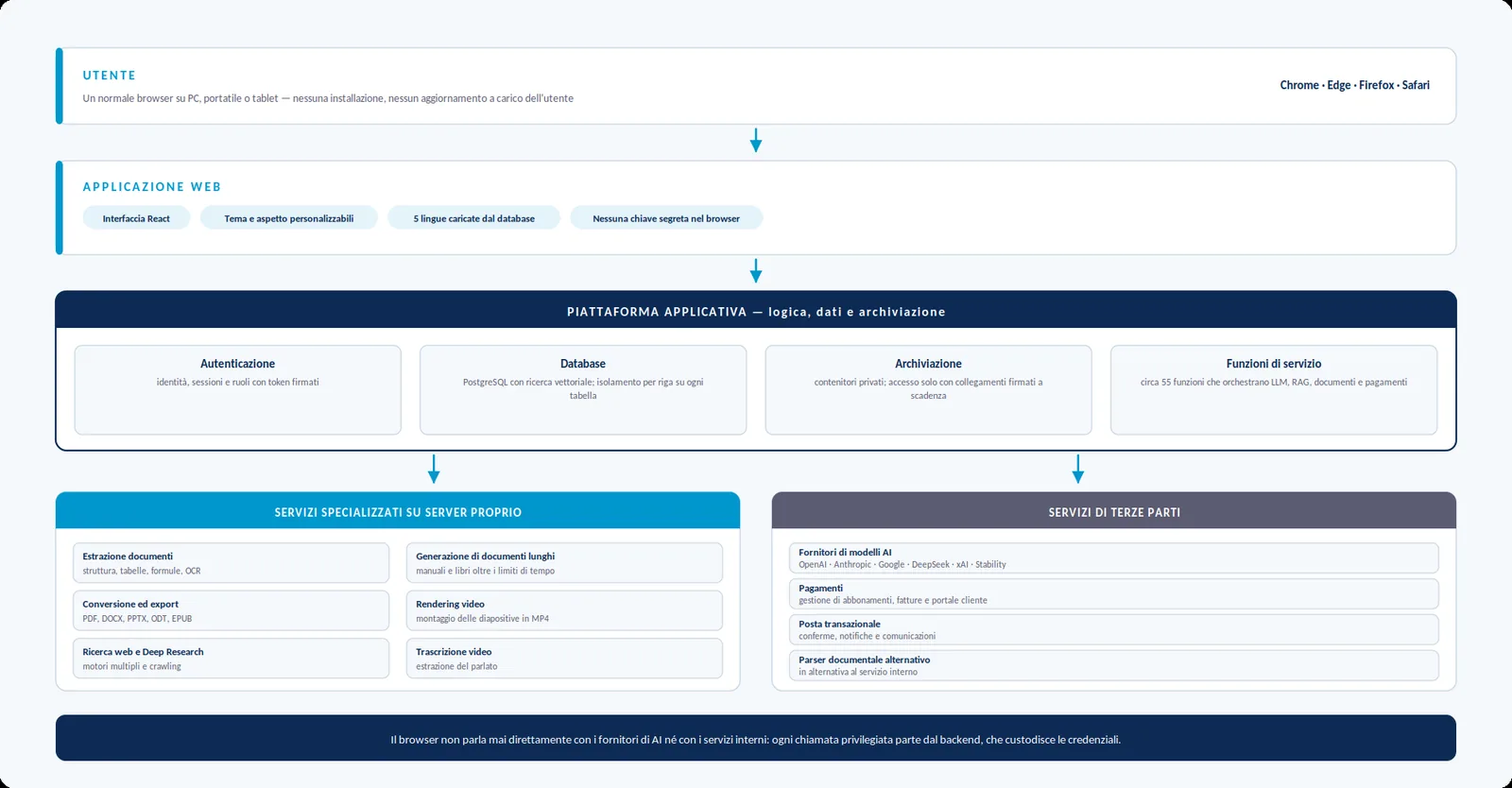
- Independence from AI providers — the catalogue of providers, models, their access tiers and their price lists is configuration, not code. Adding a new model or retiring an obsolete one is an administrative operation of a few minutes, and historical cost stays reconstructible at the prices in force at the time.
- Heavy processing off the web path — document extraction, long-form text generation, conversion into the delivery formats and video assembly run on dedicated queue-based services. That is why it is possible to generate a manual or a book without hitting the time limits typical of web applications.
- Configurability without releases — system prompts, languages and translations, document ingestion and search parameters, plan thresholds and limits, and the application’s name and visual identity are changed from the administration panel and take effect immediately.
Data security and confidentiality
Confidentiality is not a feature bolted on afterwards: it is a design criterion running through storage, the database and every outbound call.
Private storage
No file container is public. Access to a document, an image or an export happens exclusively through short-lived signed links generated by the server at request time.
Row-level isolation
The database enforces access rules row by row: each user sees and modifies only their own data. It is not a check performed by the interface but a constraint imposed by the database engine.
Secrets out of the browser
The AI-provider, payment and mail keys never appear in the code sent to the browser: they live as backend secrets readable only by server functions. The administration panel shows their status, never their content.
Only what is needed leaves
The models are not sent the whole document, only the fragments relevant to the question at hand, retrieved from the knowledge base as temporary context for that single request. Documents the user attaches directly to a request are naturally an exception.
Authentication and roles
Access with signed, expiring tokens; administrative functions verify the role server-side on every call. After a password change the user is signed out and must authenticate again.
Tracing and diagnostics
A centralised application event log with severity levels, administrator notification on significant errors, configurable log retention and per-document diagnostics.
The web origins allowed to talk to the backend are configurable, preventing the application from being embedded in third-party sites. Payments are handled by a specialised operator: no payment-card data passes through the application or is stored in it.
Platform governance
A restricted administration panel makes it possible to govern the instance without touching the source code. The main areas:
- Users — the list of accounts with plan, consumption and counters; plan changes, credit top-ups, individual or broadcast messages, counter resets, deletion.
- Plans and credits — the plan registry with all its limits — requests, file size, documents, storage, searches, number of experts, model tier, permitted document types and export formats — and the economic parameters of the credit system.
- Models — the catalogue of providers and models with declared capabilities, context windows, historicised price lists and automatic verification of connectivity and keys.
- System prompts — all the instructions that steer the experts’ behaviour, grouped by area and editable with immediate effect.
- Languages and translations — language activation, choice of the default one and an editor for the interface strings: a correction is visible to users without any release. Should any kind of problem arise, the system falls back to English to keep international use viable.
- Knowledge base — ingestion and search parameters, optical recognition, automatic image description and tuning of compute resources according to load.
- Statistics and economics — usage dashboards by operation, user and model, with raw-data export, plus an economic dashboard comparing actual spend with the estimates shown to users.
- General settings — maintenance mode, editor auto-save, mail, file and video-generation parameters, log retention, and the application’s visual identity.
Plans, credits and cost transparency
ExpertForge uses a credit model: every operation that engages an AI model consumes an amount of credits proportional to the work actually performed and to the model chosen. Credits make very different operations comparable — a chat answer, generating a manual, producing an image — and above all they make the cost visible before it is incurred.
The four plans
The plans differ in usage volume, the power of the accessible models and the tools enabled. The table summarises the main differences.
| Feature | Free | Plus | Pro | Business |
|---|---|---|---|---|
| Experts in parallel | 1 | 1 | 2 | 3 |
| AI model tier | basic | basic | advanced | all, flagship models included |
| Documents in the knowledge base | 5 | 30 | 150 | unlimited |
| Storage | 100 MB | 500 MB | 2 GB | 10 GB |
| AI document summaries | — | yes | yes | yes |
| Web searches per month | — | 15 | 60 | unlimited |
| Deep Research | — | fast level | up to standard | all levels |
| Document generation | — | yes | yes | yes |
| Export formats | — | Markdown, HTML, PDF | all except ODT and EPUB | all six |
| Monthly credits included | trial allowance | yes | yes | yes |
Summary comparison of the plans, at the values in force on the document’s issue date.
The availability of image and video generation, the document types that can be generated and the monthly credit allowance are defined plan by plan and listed on the pricing page. Plan configuration can be changed from the administration panel: the values shown are those in force on the document’s issue date.
Subscription and credit-pack prices are published and always up to date at expertforge.boardesign.it/pricing. They are subject to change and are therefore not reproduced here; an early-subscriber offer is currently running on the paid plans.
Alongside the credits included in the subscription, additional packs can be bought at any time. Subscription-plan credits renew each period and, if unused, expire at the end of the subscription period; purchased credits (credit packs) do not expire and accumulate: they are only drawn on once the plan’s credits are exhausted.
How a cost arises and how it is settled
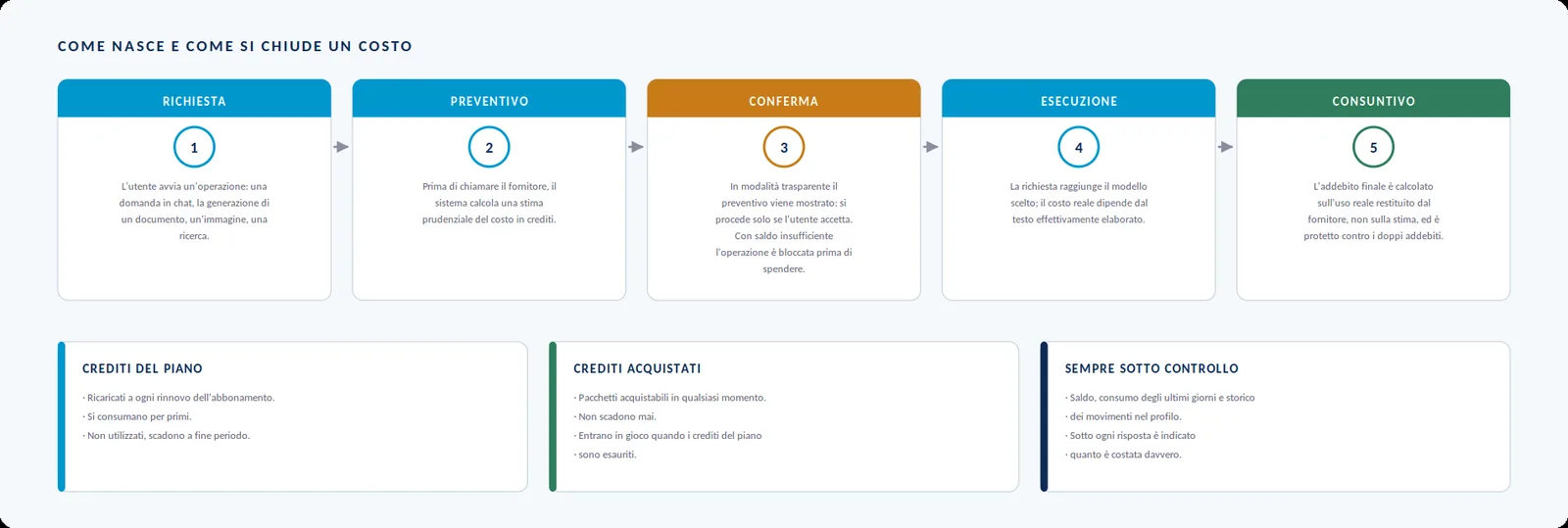
The estimate is deliberately conservative: since it involves content production by AI models that cannot be predetermined, it cannot be computed exactly. The final figure, by contrast, is computed on the actual usage reported by the provider. If the balance is not enough to cover the estimate, the operation is stopped.
- Chat answers — one for each expert queried — and the team leader’s synthesis.
- Ingesting documents into the knowledge base (vectorising the information) and generating summaries.
- Advanced knowledge-base searches with query expansion, web-source synthesis, Deep Research and video interpretation.
- Document generation, refinements, and the production of images, diagrams, charts and formulas.
- Assembling video presentations and video-recording the applications.
Plain web search, by contrast, consumes no credits: a cost only arises when the results are reworked by a model. Likewise, navigating the application, browsing the archive, organising by project and exporting already-generated documents are free operations.
ExpertForge Enterprise
Alongside the standard version available directly online, an Enterprise version is planned for organisations that do not want their documentation to reside on external infrastructure. The user experience stays identical — corporate users work from the browser on their own PCs, exactly as today — but the application and the services that make it up reside on the customer’s server instead of on BoarDesign infrastructure.
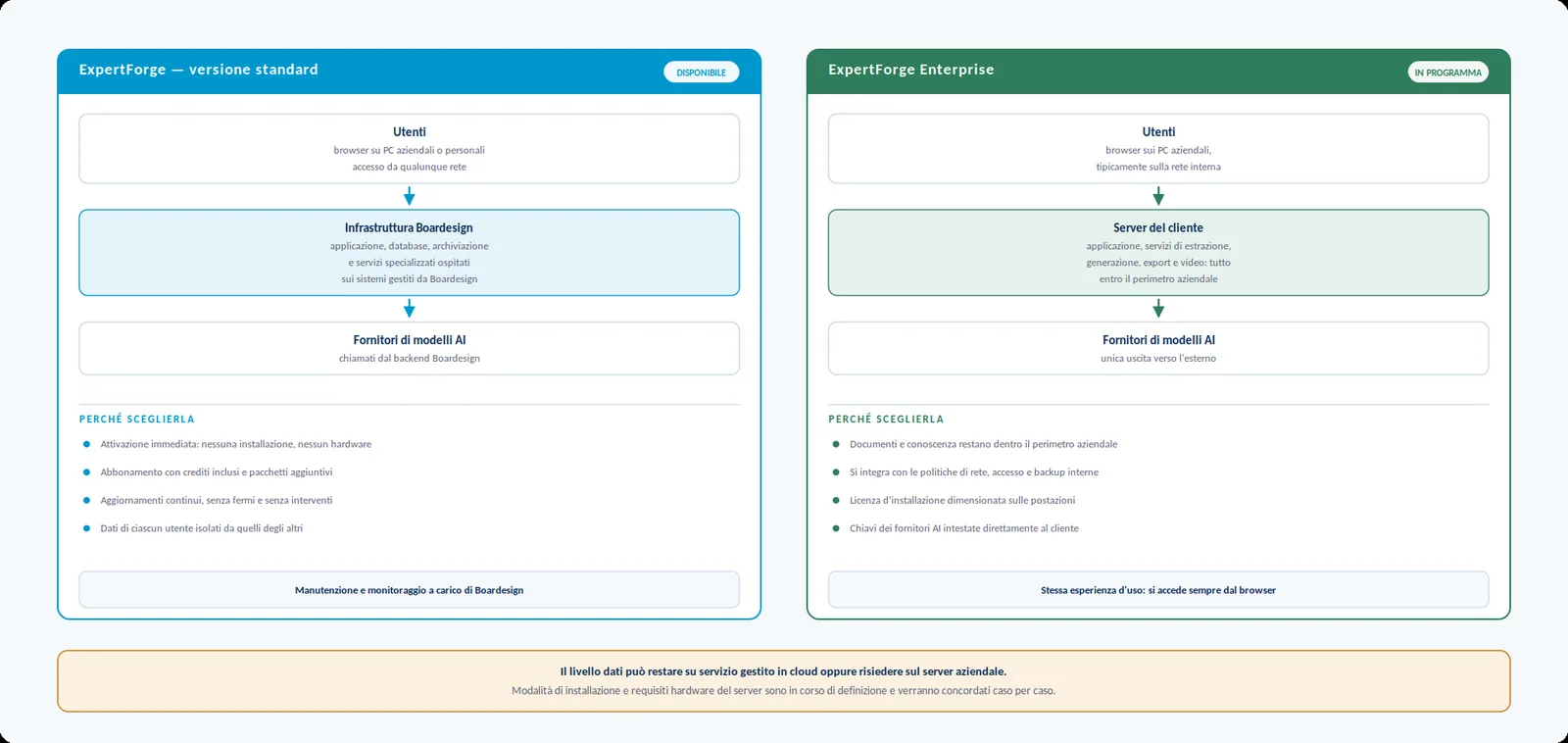
In this configuration documents, the knowledge base, generated resources and conversation history never leave the corporate perimeter. The only outbound communication that remains is the one to the language-model providers, made with keys registered and billed directly to the company — and if the organisation has local models served internally, the provider catalogue is configurable in that direction too.
Conclusions and next steps
ExpertForge brings together three things that usually live in different tools: a conversational assistant able to compare several models, a document archive searchable by meaning, and a generator of delivery-ready documents. The combination produces an effect none of the three parts would give on its own: accumulated knowledge stops being material to consult and becomes productive capacity — enriched by web research, image and infographic generation, and the generation of small applications such as dashboards, animations and calculators, with adjustable levels of grounding in your own knowledge base.
The application is reachable at expertforge.boardesign.it, where you can sign up and evaluate it on the free plan. For a guided demonstration, for customising the instance with your organisation’s visual identity, for assisted construction of a corporate knowledge base, or to evaluate the Enterprise version, BoarDesign is available at its usual contacts.
Try ExpertForge on the Free plan
Sign up and evaluate the application on real work, with your own documents. No credit card, no installation: it runs in the browser.
Try it on the Free plan →Open sign-up, no credit card required.